root-context.xml 에서 beans graph가 안 보여요!!!
우클릭 후 스프링 - show requestmappings 눌러보세요
---
3장 스프링과 오라클 데이터베이스 연동설정 및 테스트
@Log4j2
@NoArgsConstructor

//테스트 메소드 수행시 스프링 프레임워크까지 함께 구동되도록 해주는 어노테이션 설정 추가
// JUnit5 방식
@ExtendWith(SpringExtension.class)
@ContextConfiguration(locations = {
		"file:src/main/webapp/WEB-INF/spring/root-context.xml"
})

@TestInstance(Lifecycle.PER_CLASS)
@TestMethodOrder(MethodOrderer.OrderAnnotation.class)
public class HikariDataSourceTests {

	// 밑의 @Autowired 말고 이렇게도 할 수 있다.
	// @Resource(type=javax.sql.DataSource.class)
	// @Resource
	// @Inject

	// @Setter(onMethod_={ @Resource(type=javax.sql.DataSource.class) })
	// @Setter(onMethod_={ @Resource })
	// @Setter(onMethod_={ @Inject })
	// @Setter(onMethod_={ @Autowired })


	// 빈즈 컨테이너에 의존성 주입 시그널 전송
	@Autowired
	private DataSource dataSource;

	// 선처리 작업 : 필드에 원하는 타입의 빈 객체가 잘 주입되었는지 확인
	@BeforeAll
	void beforeAll() {
		log.trace("beforeAll() invoked.");

		// 필드에 의존성 객체가 주입되었는지 확인 (주입되었다면 null이 아님)
		assertNotNull(this.dataSource);				// 방법1
//		Objects.requireNonNull(this.dataSource);	// 방법2
//		assert this.dataSource != null;				// 방법3

		log.info("\t+ this.datasource : {}", this.dataSource);

	} // beforeAll

	@Test
	@Order(1)
	@DisplayName("1. javax.sql.DataSource.getConnection() method test.")
	@Timeout(value = 10, unit = TimeUnit.SECONDS)
	void testGetConnection() throws SQLException {
		log.trace("testGetConnection() invoked.");

		// Connection Pool로부터 빌린 Connection
		Connection conn = this.dataSource.getConnection();

		// null인지 체크
		Objects.requireNonNull(conn);
		log.info("\t+ conn: {}, type: {}", conn, conn.getClass().getName());

		// Autoclosable한 자원객체 -> 썼으면 닫자 // @Cleanup, try-with-resources 추천
		conn.close();
		// 이 close는 Connection을 끊어버리지 않는다. Connection Pool에 반납하는 것

		// cf) jdbc에서 순서대로 자원객체 닫을 때 -> 거꾸로 적어준다
		// try(Connection; PreparedStatement; ResultSet;) { ;; }

	} // testGetConnection

	// 이 정도로는 부족하다! 실제 SQL문으로 확인해보자

	@Test
	@Order(2)
	@DisplayName("2. javax.sql.DataSource.getConnection() method test. with SQL test")
	@Timeout(value = 10, unit = TimeUnit.SECONDS)
	void testGetConnectionWithSql() throws SQLException {
		log.trace("testGetConnectionWithSql() invoked.");

		// Connection Pool로부터 빌린 Connection
		Connection conn = this.dataSource.getConnection();

		Statement stmt = conn.createStatement();
		ResultSet rs = stmt.executeQuery("SELECT * FROM employees");

		try(conn; stmt; rs;) {

			while(rs.next()) {
				// rs.getXXX(컬럼명)에서 "컬럼명"은 대소문자를 구분하지 않음.
				String employee_id = rs.getString("employee_id");
				String first_name = rs.getString("first_name");
				String last_name = rs.getString("last_name");
				String email = rs.getString("email");
				String phone_number = rs.getString("phone_number");
				String hire_date = rs.getString("hire_date");
				String job_id = rs.getString("job_id");
				String salary = rs.getString("salary");
				String commission_pct = rs.getString("commission_pct");
				String department_id = rs.getString("department_id");

				log.info("{}, {}, {}, {}, {}, {}, {}, {}, {}, {}, ",
						employee_id, first_name, last_name, email, phone_number,
						hire_date, job_id, salary, commission_pct, department_id);
			} // while
		} // try-with-resources
	} // testGetConnectionWithSql

} // end class
HikariDataSourceTests.java (더미테스트는 빼고)

---
이 정도로는 부족하다! 마이바티스로 해보자
   <!-- === MyBatis's DataSource Configuration === -->

   <bean
      primary="true"
      name="John"
      id="pooledDataSource"
      class="org.apache.ibatis.datasource.pooled.PooledDataSource"
      destroy-method="forceCloseAll" >
      <description>MyBatis Pooled Data Source</description>

      <property name="driver"    value="net.sf.log4jdbc.sql.jdbcapi.DriverSpy"/>
      <!-- <property name="url"       value="jdbc:log4jdbc:oracle:thin:@ㅇㅇㅇ"/> -->
      <property name="url"       value="jdbc:log4jdbc:oracle:thin:@ㅇㅇㅇ"/>
      <property name="username"  value="HR"/>
      <property name="password"  value="ㅇㅇㅇ"/>

      <property name="poolMaximumActiveConnections"  value="5"/>
      <property name="poolMaximumIdleConnections"    value="2"/>
      <property name="poolPingEnabled"               value="true"/>
      <property name="poolPingQuery"                 value="SELECT 1 FROM dual"/>
      <property name="loginTimeout"                  value="1"/>

   </bean>
root-context.xml
이후 HikariDataSourceTests.java에서 dummytest해보자
primary = true로
히카리와 mybatis 둘중에 선택해준다
---
4장 MyBatis와 스프링 연동
SQL Mapping 프레임워크
SQL과 Object간의 관계를 매핑해주는 역할
JDBC코드에 비해 처리하는 부분이 간결해지고, close처리등이 지원
Spring에서의 사용
스프링은 MyBatis와의 연결을 위한 mybatis-spring 라이브러리을 이용해서 연동 처리
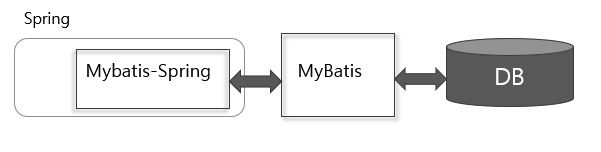
pom.xml에 mybatis와 mybatis-spring dependency 추가해주자
		<dependency>
			<groupId>org.springframework</groupId>
			<artifactId>spring-jdbc</artifactId>
			<version>${org.springframework-version}</version>
		</dependency>

		<dependency>
			<groupId>org.springframework</groupId>
			<artifactId>spring-tx</artifactId>
			<version>${org.springframework-version}</version>
		</dependency>
pom.xml
--
MyBatis Framewokr의 핵심객체는 무엇인가?! -> SqlSessionFactory!
공장이 있어야 찍어낸다!
이 공장을 Spring Beans Container에 Bean 객체로 등록해주면 된다.
mybatis-spring 라이브러리에는 SqlSessionFactoryBean이라는 타입(클래스)가 들어있다.
스프링의 Beans Container에 Bean으로 동록할 수 있게 해주는 Bean 클래스이다. 얘를 등록해주자
root-context.xml에 MyBatis설정
MyBatis의 핵심 객체는 SqlSessionFactory타입의 객체
SqlSessionFactoryBean은 내부적으로 MyBatis의 SqlSessionFactory를 생성
   <bean id="sqlSessionFactory" class="org.mybatis.spring.SqlSessionFactoryBean">
      <property name="dataSource" ref="hikariDataSource" />
      <!-- <property name="dataSource" ref="pooledDataSource" /> -->

      <property name="configLocation" value="classpath:mybatis-config.xml" />
      <!-- 만약 마이바티스 설정파일의 위치를 설정했다면
         아래의 속성은 절대!!! 설정하지 말 것!!! -->
      <!-- <property name="mapperLocations" value="classpath:mappers/**/*Mapper.xml" /> -->
   </bean>
root-context.xml
--
이제 설정은 완료!
SqlSessionFactoryBean이 잘 주입이 되는지 확인해보자
Mapper Interface 방식과 Mapper XML 방식으로 테스트해보자
@Log4j2
@NoArgsConstructor

//테스트 메소드 수행시 스프링 프레임워크까지 함께 구동되도록 해주는 어노테이션 설정 추가
// JUnit5 방식
@ExtendWith(SpringExtension.class)
@ContextConfiguration(locations = {
		"file:src/main/webapp/WEB-INF/spring/root-context.xml"
})

@TestInstance(Lifecycle.PER_CLASS)
@TestMethodOrder(MethodOrderer.OrderAnnotation.class)
public class SqlSessionFactoryTests {

	@Setter(onMethod_= {@Autowired})
	private SqlSessionFactory sqlSessionFactory;

	@BeforeAll
	void boforeAll() {
		log.trace("boforeAll() invoked.");

		// 필드에 의존성 객체가 주입되었는지 확인 (주입되었다면 null이 아님)
		assertNotNull(this.sqlSessionFactory);				// 방법1
//		Objects.requireNonNull(this.sqlSessionFactory);	    // 방법2
//		assert this.sqlSessionFactory != null;				// 방법3

		log.info("\t+ this.sqlSessionFactory : {}", this.sqlSessionFactory);

	} // boforeAll


	@Test
	void dummyTest() {
		log.trace("dummyTest() invoked.");

	} // dummyTest


} // end class
SqlSessionFactoryTests.java
<?xml version="1.0" encoding="UTF-8"?>

<!DOCTYPE mapper
    PUBLIC "-//mybatis.org//DTD Mapper 3.0//EN"
    "http://mybatis.org/dtd/mybatis-3-mapper.dtd">


<mapper namespace="FirstMapper">

    <select
        id="DQL1"
        resultType="org.zerock.myapp.domain.EmployeeVO" >
        SELECT *
        FROM employees
        WHERE employee_id > #{empid}
    </select>

</mapper>
src/main/resources/firstmapper
<?xml version="1.0" encoding="UTF-8"?>

<!DOCTYPE mapper
    PUBLIC "-//mybatis.org//DTD Mapper 3.0//EN"
    "http://mybatis.org/dtd/mybatis-3-mapper.dtd">


<mapper namespace="SecondMapper">

    <select
        id="DQL2"
        resultType="org.zerock.myapp.domain.EmployeeVO" >
        SELECT *
        FROM employees
        WHERE email LIKE #{email} AND salary > #{sal}
    </select>

</mapper>
src/main/resources/secondmapper
@Value // 한번에 vo클래스로 만들어주는 어노테이션 cf) DTO, 자바빈즈는 @Data
public class EmployeeVO {

	// 0) 테이블의 컬럼의 순서와 필드의 순서를 동일하게 작성한다. (***순서*** 타입 이름 모두 동일해야함!!!)
	// 1) VO class의 필드는 외부에서 접근하지 못하게 private으로 한다.
	// 2) 테이블의 컬럼은 NULL (결측치)가 있을 수 있기 때문에 기본 타입인 int가 아니고
	//    결측치를 표현할 수 있는 Integer로 필드를 선언해야한다.

	// 자바 식별자 규칙에 따르면 파이널 상수만이 모두 대문자로 표기하기 때문에
    // 소문자로 바꿔주고 카멜기법도 적용하자
	private Integer employeeId;
	private String firstName;
	private String lastName;
	private String email;
	private String phoneNumber;
	private Date hireDate;
	private String jobId;
	private Integer salary;
	private Integer commissionPct;
	private Integer managerId;
	private Integer departmentId;

} // end class
employeeVO.java
이제 SqlSessionFactoryTests.java에 테스트 메소드 만들어주자
@Log4j2
@NoArgsConstructor

//테스트 메소드 수행시 스프링 프레임워크까지 함께 구동되도록 해주는 어노테이션 설정 추가
// JUnit5 방식
@ExtendWith(SpringExtension.class)
@ContextConfiguration(locations = {
		"file:src/main/webapp/WEB-INF/spring/root-context.xml"
})

@TestInstance(Lifecycle.PER_CLASS)
@TestMethodOrder(MethodOrderer.OrderAnnotation.class)
public class SqlSessionFactoryTests {

	@Setter(onMethod_= {@Autowired})
	private SqlSessionFactory sqlSessionFactory;

	@BeforeAll
	void boforeAll() {
		log.trace("boforeAll() invoked.");

		// 필드에 의존성 객체가 주입되었는지 확인 (주입되었다면 null이 아님)
		assertNotNull(this.sqlSessionFactory);				// 방법1
//		Objects.requireNonNull(this.sqlSessionFactory);	    // 방법2
//		assert this.sqlSessionFactory != null;				// 방법3

		log.info("\t+ this.sqlSessionFactory : {}", this.sqlSessionFactory);

	} // boforeAll

	@Disabled
	@Test
	@Order(1)
	@DisplayName("1. testFirstMapperXML")
	@Timeout(value = 10, unit = TimeUnit.SECONDS)
	void testFirstMapperXML() {
		log.trace("testFirstMapperXML() invoked.");

		@Cleanup
		SqlSession sqlSession = this.sqlSessionFactory.openSession();

		// Mapped Statement를 결정하기 위한 요소 2가지
		String namespace = "FirstMapper";
		String sqlId = "DQL1";
		String sql = namespace + "." + sqlId;

//		sqlSession.selectList(sql, 130);
		List<EmployeeVO> list = sqlSession.<EmployeeVO>selectList(sql, 130);
		list.forEach(log::info);

	} // testFirstMapperXML

//	@Disabled
	@Test
	@Order(2)
	@DisplayName("2. testSecondMapperXML")
	@Timeout(value = 20, unit = TimeUnit.SECONDS)
	void testSecondMapperXML() {
		log.trace("testSecondMapperXML() invoked.");

		@Cleanup
		SqlSession sqlSession = this.sqlSessionFactory.openSession();

		// Mapped Statement를 결정하기 위한 요소 2가지
		String namespace = "SecondMapper";
		String sqlId = "DQL2";
		String sql = namespace + "." + sqlId;

		// SQL 문장에 줄 바인딩 변수가 2개! 이러면 Map객체 혹은 자바빈즈 객체를 사용한다.
		// 지난번엔 Map 객체로 했다! (90일차) 이번엔 자바빈즈로 해보자 (property가 바인딩 변수명)

		@Data
		class Parameters { // 로컬 클래스로 자바빈즈 클래스를 만들자
			private String email;
			private Double sal;
		} // end class

		// 자바빈즈 객체를 생성하자
		Parameters params = new Parameters();

		// 바인딩 변수의 값을 넣어주자
		params.setEmail("%A%");
		params.setSal(7000.0);

		// 자바빈즈 객체 params로 전해주자
		List<EmployeeVO> list = sqlSession.<EmployeeVO>selectList(sql, params);
		list.forEach(log::info);

	} // testSecondMapperXML


} // end class
SqlSessionFactoryTests.java
*이제 mybatis-config.xml에 mappers 태그로 FirstMapper.xml 등록해주자
<?xml version="1.0" encoding="UTF-8"?>

<!DOCTYPE configuration
  PUBLIC "-//mybatis.org//DTD Config 3.0//EN"
  "http://mybatis.org/dtd/mybatis-3-config.dtd">

<configuration>

    <mappers>
        <mapper resource="mappers/FirstMapper.xml" />
        <mapper resource="mappers/SecondMapper.xml" />
    </mappers>

</configuration>
mybatis-config.xml
'국비학원' 카테고리의 다른 글
| [국비지원] KH 정보교육원 98일차 (0) | 2022.08.17 |
|---|---|
| [국비지원] KH 정보교육원 97일차 (0) | 2022.08.16 |
| [국비지원] KH 정보교육원 95일차 (0) | 2022.08.11 |
| [국비지원] KH 정보교육원 92-94일차 (0) | 2022.08.11 |
| [국비지원] KH 정보교육원 91일차 (0) | 2022.08.11 |


