서블릿에서 파일 접근 ( 읽기 모드 )
서블릿에서 웹 어플리케이션내의 특정 파일을 접근하기 위해서 ServletContext 객체를 사용
할 수 있다. 단, 읽기 모드만 가능하고 쓰기는 불가능하다.
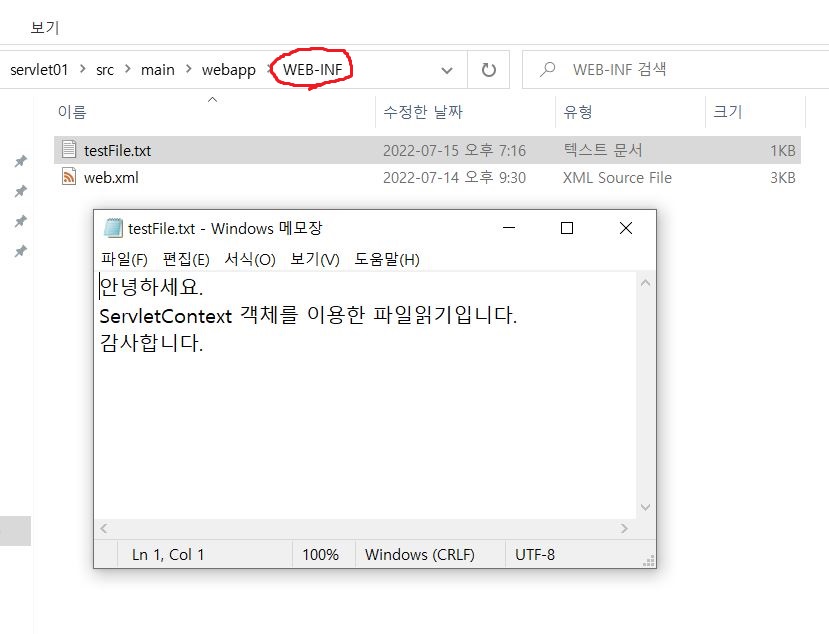
먼저 서블릿에서 읽을 텍스트 파일을 웹 어플리케이션의 WEB-INF 폴더에 testFile.txt 형식
으로 작성하고, 내용을 입력 시킨 후에 저장한다
@WebServlet("/ContextFile")
public class ContextFileServlet extends HttpServlet {
	private static final long serialVersionUID = 1L;

	@Override
	protected void service(HttpServletRequest req, HttpServletResponse res)
			throws ServletException, IOException {
		log.trace("service(req, res) invoked.");

		try {
			// ServletContext를 이용해 "src/main/webapp/WEB-INF/testFile.txt" 읽어내자
			// "/WEB-INF/testFile.txt" (웹 어플리케이션 기준으로 보면, Content Root가 사라짐)
			ServletContext sc = req.getServletContext(); // this. 말고 req. 로 얻자
			@Cleanup
			InputStream is = sc.getResourceAsStream("/WEB-INF/testFile.txt");  // InputStream 객체 얻기
			@Cleanup
			BufferedReader br = new BufferedReader(new InputStreamReader(is)); // 성능 향상

			// 응답문서 작성
			res.setContentType("text/html; charset=UTF-8");
			@Cleanup
			PrintWriter out = res.getWriter();

			out.println("<ol>");

			String line;
			while ( (line = br.readLine()) != null) {
				out.println("<li>" + line + "</li>");
			} // while

			out.println("</ol>");

			out.flush(); // 잔류 데이터 방출

		} catch (Exception e) {
			throw new IOException(e);
		} // try-catch

	} // service
ContextFileServlet.java
---
서블릿에서 속성(attribute) 설정 및 참조
웹 어플리케이션에서 브라우저를 종료해도 지속적으로 사용해야 되는 데이터가 필요하다면, application scope에 해당되는 속성(attribute)을 사용할 수 있다.
대표적인 예로 ‘웹 사이트의 방문자수 조회’ 형태로서, 웹 어플리케이션을 종료할 때까지 속성 값은 유지된다
브라우저를 종료하고 다시 접속해도 계속 유지되는, 즉 지속적으로 사용해야
되는 데이터를 ServletContext 객체의 setAttribute(name,value) 메서드로 저장하고, getAttribute(name) 메서드로 참조하는 예제이다
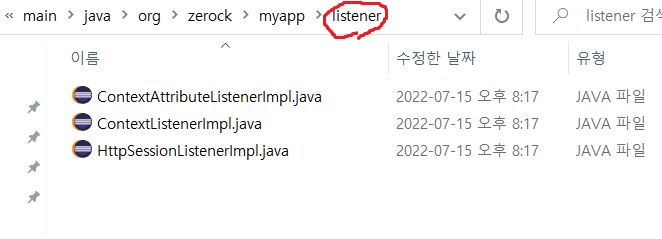
탑레벨 폴더 밑에 listener 패키지를 만들어서 위 파일들을 넣어준다
@Log4j2
@NoArgsConstructor

@WebServlet("/ContextSet")
public class ContextSetServlet extends HttpServlet {
	private static final long serialVersionUID = 1L;

	@Override
	protected void service(HttpServletRequest req, HttpServletResponse res)
			throws ServletException, IOException {
		log.trace("service(req, res) invoked.");

		try {
			// 속성값설정
			String name = "홍길동";
			int age = 20;

			ServletContext sc = req.getServletContext();
			sc.setAttribute("name", name);
			sc.setAttribute("age", age);

		} catch (Exception e) {
			throw new IOException(e);
		} // try-catch

	} // service

} // end class
ContextSetServlet.java

@Log4j2
@NoArgsConstructor

@WebServlet("/ContextGet")
public class ContextGetServlet extends HttpServlet {
	private static final long serialVersionUID = 1L;

	@Override
	protected void service(HttpServletRequest req, HttpServletResponse res)
			throws ServletException, IOException {
		log.trace("service(req, res) invoked.");

		try {
			// 속성 값 얻기
			ServletContext sc = req.getServletContext();
			String name = (String)sc.getAttribute("name");
			int age = (Integer)sc.getAttribute("age");

			// 응답문서 작성
			res.setContentType("text/html; charset=UTF-8");
			@Cleanup
			PrintWriter out = res.getWriter();

			out.println("<html><body>");
			out.println("이름 : " + name + "<br>");
			out.println("나이 : " + age + "<br>");
			out.println("</html></body>");

			out.flush();

			//----------

			sc.removeAttribute("name");  // 속성 값 내리기
			sc.removeAttribute("age");   // 속성 값 내리기

		} catch (Exception e) {
			throw new IOException(e);
		} // try-catch

	} // service

} // end class
ContextGetServlet.java
---
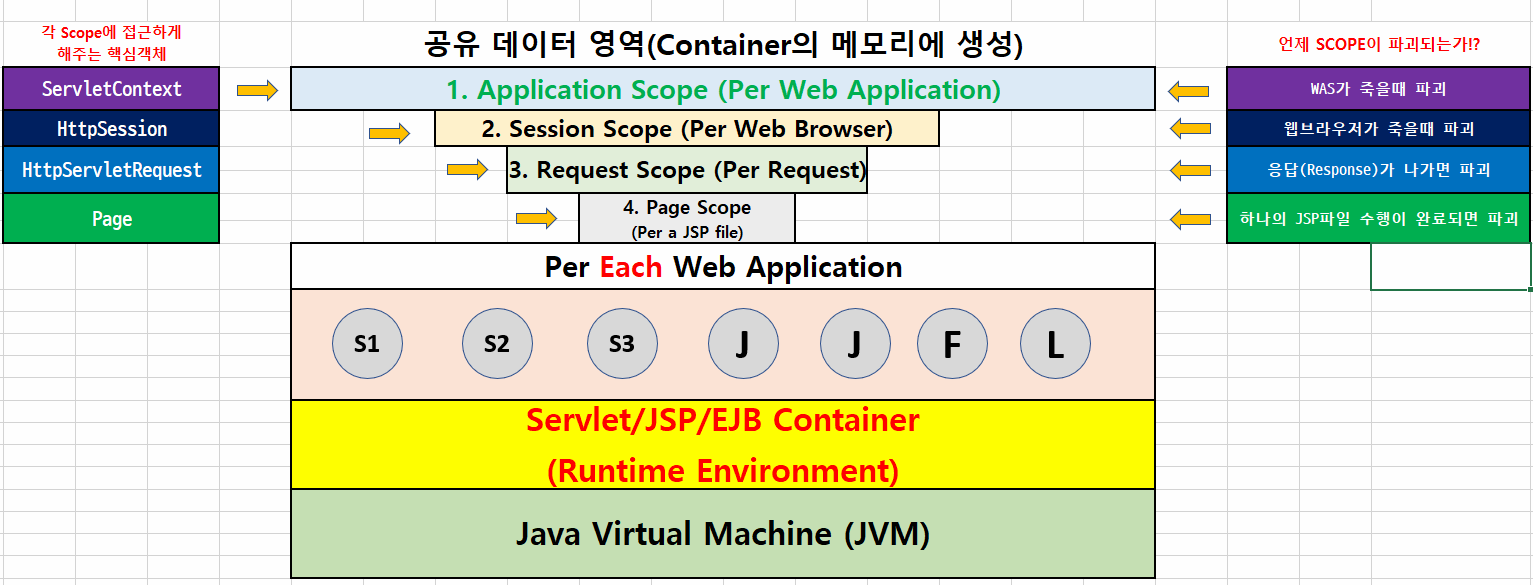
(1) App.scope 공유속성(공유객체)을 CRUD하는 메소드
- ServletContext.setAttribute(name, value); -> C, U
- ServletContext.getAttribute(name); -> R
- ServletContext.removeAttribute(name); -> D
(2) Sesseion.scope 공유속성(공유객체)을 CRUD하는 메소드
- HttpSession.setAttribute(name, value); -> C, U
- HttpSession.getAttribute(name); -> R
- HttpSession.removeAttribute(name); -> D
(3) Request.scope 공유속성(공유객체)을 CRUD하는 메소드
- HttpServletRequest.setAttribute(name, value); -> C, U
- HttpServletRequest.getAttribute(name); -> R
- HttpServletRequest.removeAttribute(name); -> D
---
3. ServletContextListener
서블릿이 LifeCycle를 가지고 있는 것처럼, 웹 어플리케이션도 LifeCycle를 갖는다.
Tomcat 컨테이너가 시작될 때 웹 어플리케이션도 초기화되고, Tomcat 컨테이너가 종료될 때 웹 어플리케이션도 제거된다.
웹 어플리케이션이 초기화되고 제거되는 이벤트를 감지하는 ServletContextListener API를 사용하면, 언제 초기화되고 제거 되었는지를 쉽게 알 수 있다
다음은 ServletContextListener API 계층 구조이며, interface로서 다음과 같은 2가지 메서드를 갖는다.

* context = wep application
서블릿을 호출하려면 ( / 뒤에 ) 맵핑된 URI를 호출해야한다.
그러려면 웹 어플리케이션이 알맞은 URI가 무엇인지, *맥락, 전후사정을 파악하고 있어야한다.
그래서 context = wep application 라고 하는 것임
---
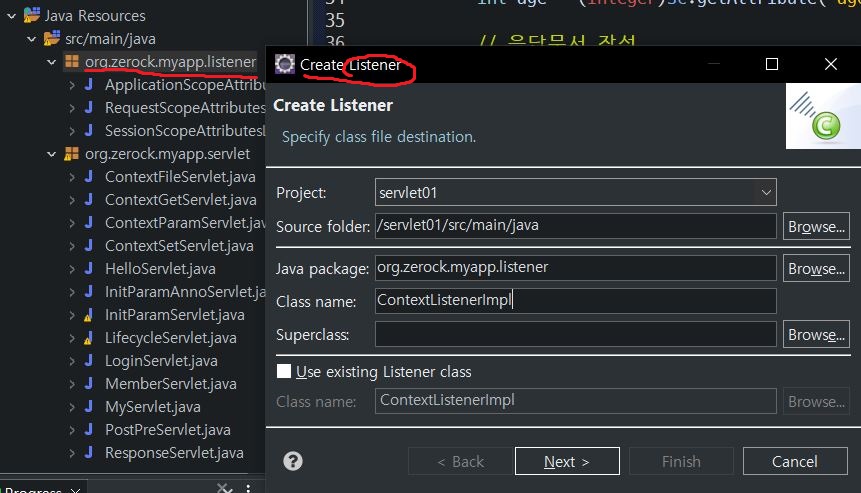
리스너 등록해보자

@Log4j2
@NoArgsConstructor

@WebListener
public class ServletContextListenerImpl implements ServletContextListener {

	// * Context = Web application

	// 우리가 만든 Web Application이 WAS를 따라 올라오면서 초기화 될때
	// Servlet Container에 의해 콜백 된다 (WAS를 start 시키고 로그 확인)
	@Override
	public void contextInitialized(ServletContextEvent e)  {
		log.trace("contextInitialized({}) invoked", e);
	} // contextInitialized

	// 우리가 만든 Web Application이 WAS를 따라 내려가면서 초기화 될때
	/// Servlet Container에 의해 콜백 된다	(WAS를 stop 시키고 로그 확인)
	@Override
    public void contextDestroyed(ServletContextEvent e)  {
		log.trace("contextDestroyed({}) invoked", e);
    } // contextDestroyed

} // end class
ServletContextListenerImpl
'국비학원' 카테고리의 다른 글
| [국비지원] KH 정보교육원 79일차 (0) | 2022.07.20 |
|---|---|
| [국비지원] KH 정보교육원 78일차 (0) | 2022.07.20 |
| [국비지원] KH 정보교육원 76일차 (0) | 2022.07.15 |
| [국비지원] KH 정보교육원 75일차 (0) | 2022.07.14 |
| [국비지원] KH 정보교육원 69-74일차 (0) | 2022.07.13 |


